The Dock
The widget bar along the bottom of every panel — Hub strip, macro sets, connection status and show transport.
The dock is the bar along the bottom of the screen, present on every panel. It holds Version T’s widgets — small glass cards that give you navigation, connection status and show transport without leaving whatever panel you’re working in.

The widgets
Left to right:
| Widget | Looks like | Tap opens |
|---|---|---|
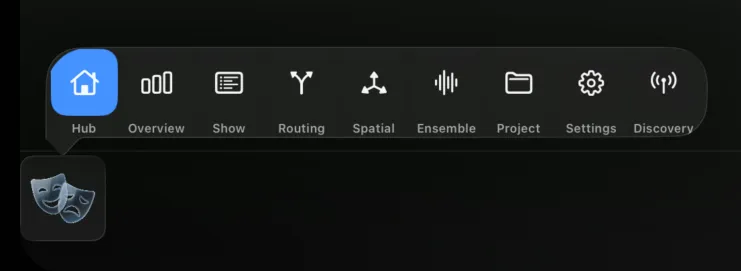
| Hub | Theatre masks | The Hub strip — jump to any panel from here |
| Macro Sets | A short name per set | That set’s macros |
| Connection | Antenna, tinted by state | Console details and Disconnect |
| Transport | Green play | Store · scene / T-list · Prev / Next / GO |
The Hub and Macro Set cards sit at the left; Connection and Transport sit at the right.
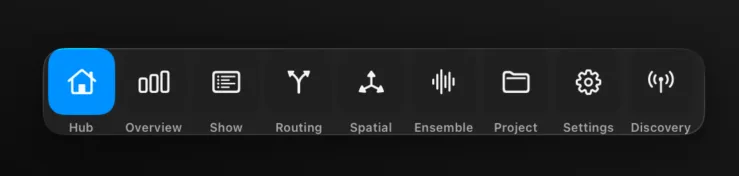
Hub. Tap the masks to open the Hub strip — a compact row of every panel (Hub, Overview, Show, Routing Sets, Spatial Panner, Ensemble, Project, Settings, Discovery), with the current one highlighted. It’s the fastest way to move between panels, and it’s always in the same place.
Macro Sets. These cards are built automatically from your show data — one per macro set. Tap a card to reveal that set’s macros and fire them. If your show has no macro sets, no cards appear here.
Connection. The antenna is tinted by connection state — green connected, orange connecting, red error, grey offline. Tap it for the console’s details and a Disconnect button.
Transport. Tap the green play card for the transport strip: Store (when the T-list is active), the scrollable scene / T-list, and Prev / Next / GO. Transport is hidden on the Show panel, which has these controls inline.
Tap to open, drag to float
Every dock card behaves the same way:
- Tap — opens the widget’s strip as a popover above the card.
- Drag up — undocks the widget into a floating panel you can drop anywhere on screen. Handy for keeping transport or the Hub strip visible while you work in a panel.
- Drag a floating widget back down — redocks it.
The Connection widget is fixed — it stays in the dock and doesn’t float.