Routing Sets
Pre-wired signal paths — define a mic's full routing once, then assign it per cue with a single tap.
What a routing set is
A routing set is a pre-wired signal path. For every mix bus in the pool it defines whether this input is fed, at what level, and whether the send is pre-fader, post-fader or a group tap. You build the sets once; per cue you simply assign each mic to a set, and Version T writes all the crosspoints for you.
That assignment is the whole point: instead of touching dozens of sends per cue, you make one choice — “this mic is on Principal now” — and the DSP detail already lives in the set. The console holds the live result; the set definitions live in Version T and recall onto any console you connect to.
A musical-theatre example
A show might define a handful of sets:
| Set | Purpose |
|---|---|
| Principal | Solo dialogue and lead vocal — FOH, IEM detail, program feed |
| Ensemble 1 | Upstage chorus — FOH cluster, band feed, broadcast |
| Ensemble 2 | Downstage chorus — different FOH position, separate monitors |
| Booth | Offstage/booth mic — local PA only, no monitors |
| Off | Not in this scene — all sends zero |
A principal’s mic sits on Principal for a solo, switches to Ensemble 1 when they join the chorus, and goes to Off between scenes. One assignment per mic per cue.
The main screen
The header shows the title, a red AUTO ACTIVE warning when any automatic mode is armed, and the Settings gear. Below it are two zones.
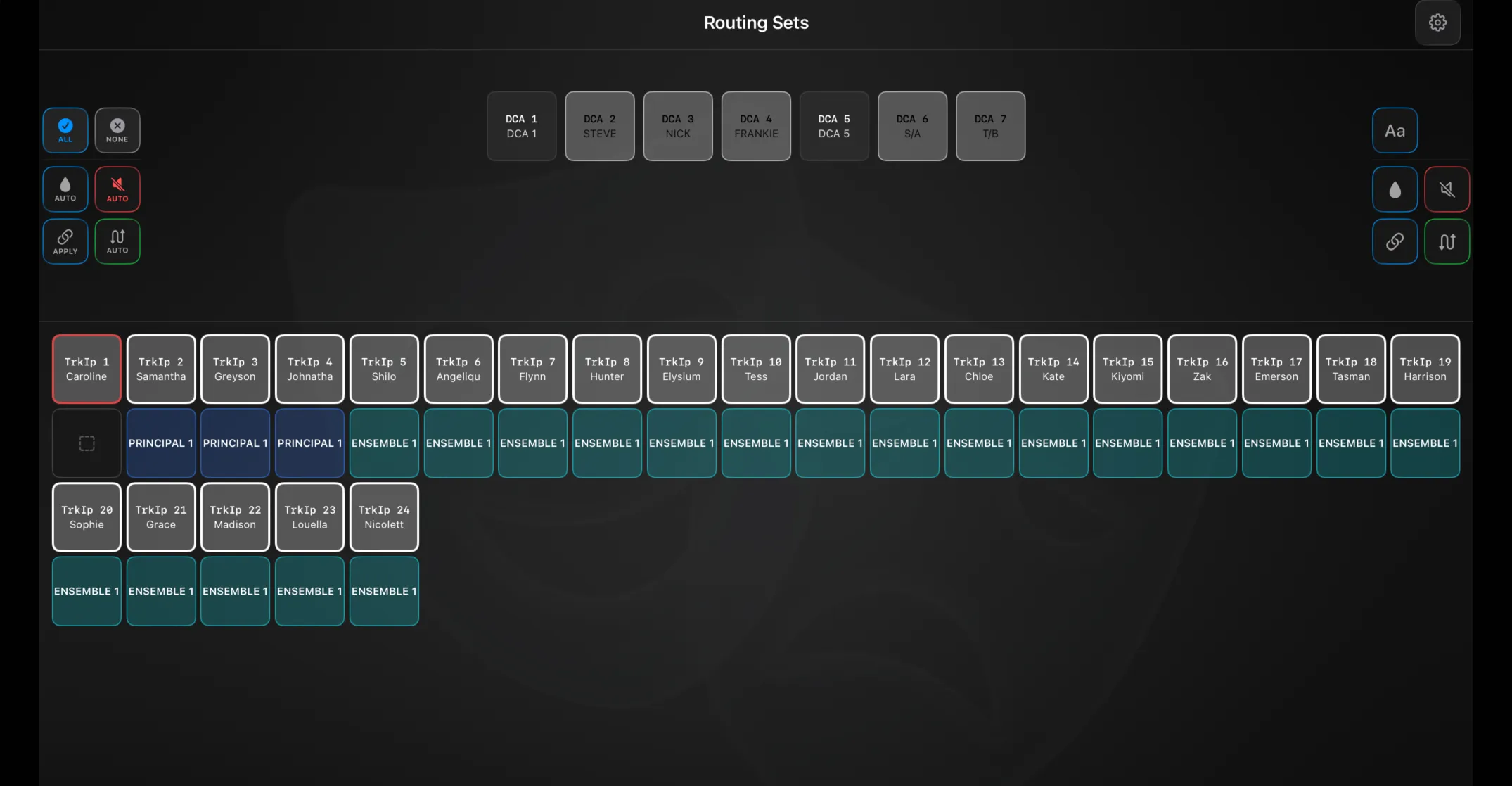
DCA panel (upper)
This is where you work with your tracked DCAs. Tap a DCA card to select it, then use the glass-mode buttons on the right to act on it:
| Mode | What it does |
|---|---|
| Name | Name the DCA — from the keyboard or a suggestion from its name history |
| Colour | Recolour it from the console palette |
| Mute | Mute mode |
| Assign | Add or remove its member inputs (from that DCA’s input history) |
| Routing Set | Link the DCA to a routing set |
The Auto buttons on the left apply things across all tracked DCAs at once: ALL / NONE (arm every auto action or clear them), Auto Colour, Auto Mute, Apply / Auto (assign inputs to DCAs from name history — tap Apply once, or long-press to latch it on), and Auto Routing (route each input to the set linked to its DCA). While any auto mode is latched the panel tints red and the header shows AUTO ACTIVE.
Routing sets grid (lower)
Every tracked input as a card, colour-coded by its current set. Used together with the glass modes to assign, mute or rename inputs.
Assigning routing
- Auto Routing — routes each tracked input to the set linked to its current DCA. The everyday one-tap recall.
- Apply / Auto Assign — assigns inputs into DCAs from their name history, so a re-patched performer lands back on the right DCA.
- Manual — select a DCA, use Routing Set mode to link a set, or Assign mode to change its members.
Preferences
The gear opens Settings → Routing, with four tabs.
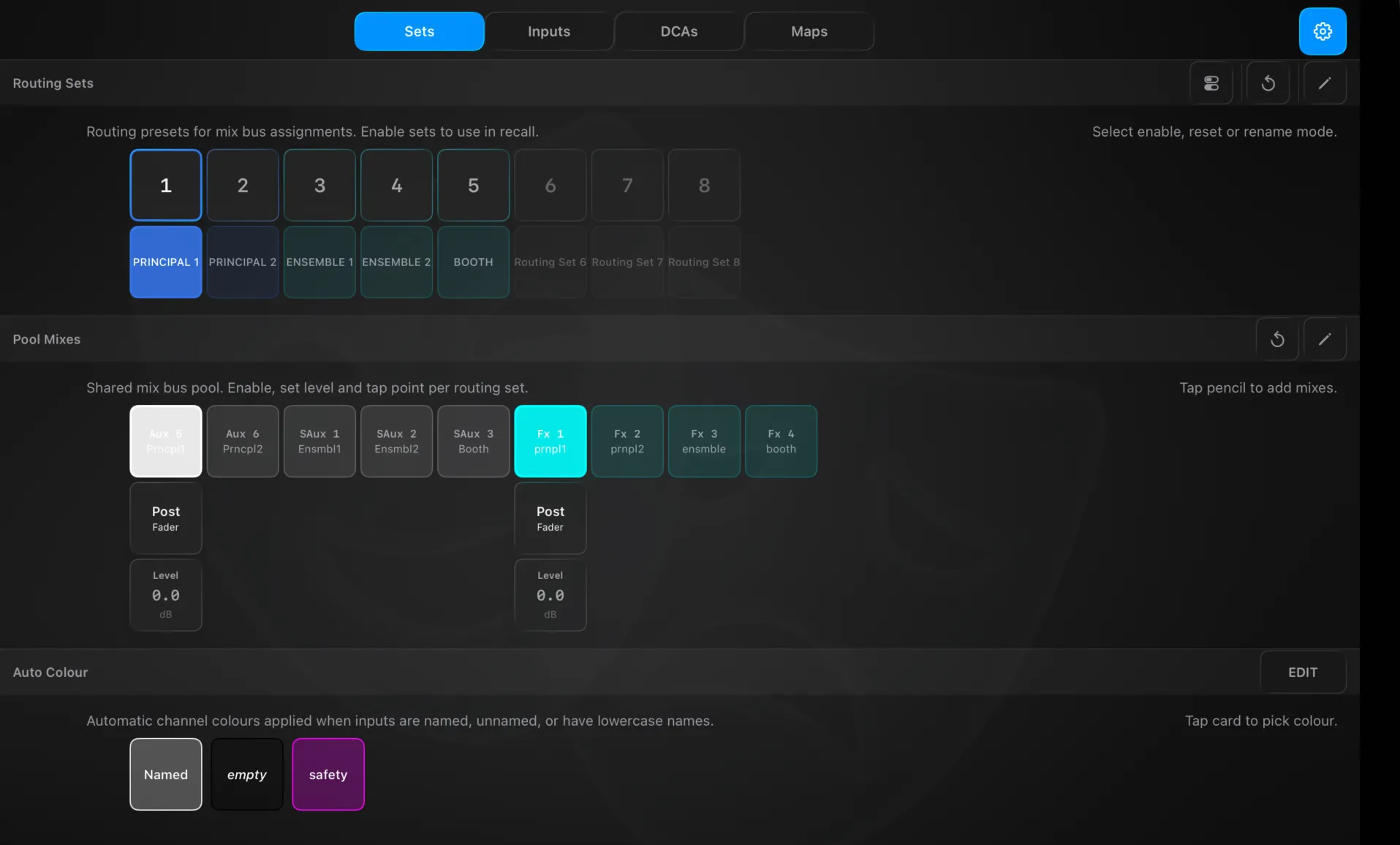
Sets
- Routing Sets — one tile per set. A mode picker switches the tiles between enable (only enabled sets are recall-eligible; a red ✗ warns an enabled set has no mix assignments), reset (clear a set), and rename (name + colour).
- Pool Mixes — the shared list of managed mix buses. The pencil adds mixes; reset clears. With a set selected, each pool mix shows an enable, a level (drag), and a pre/post tap that cycles Pre → Post (and Group on WING / X32-M32).
- Auto Colour — the colours auto-applied to named, unnamed and lowercase (“safety”) inputs.
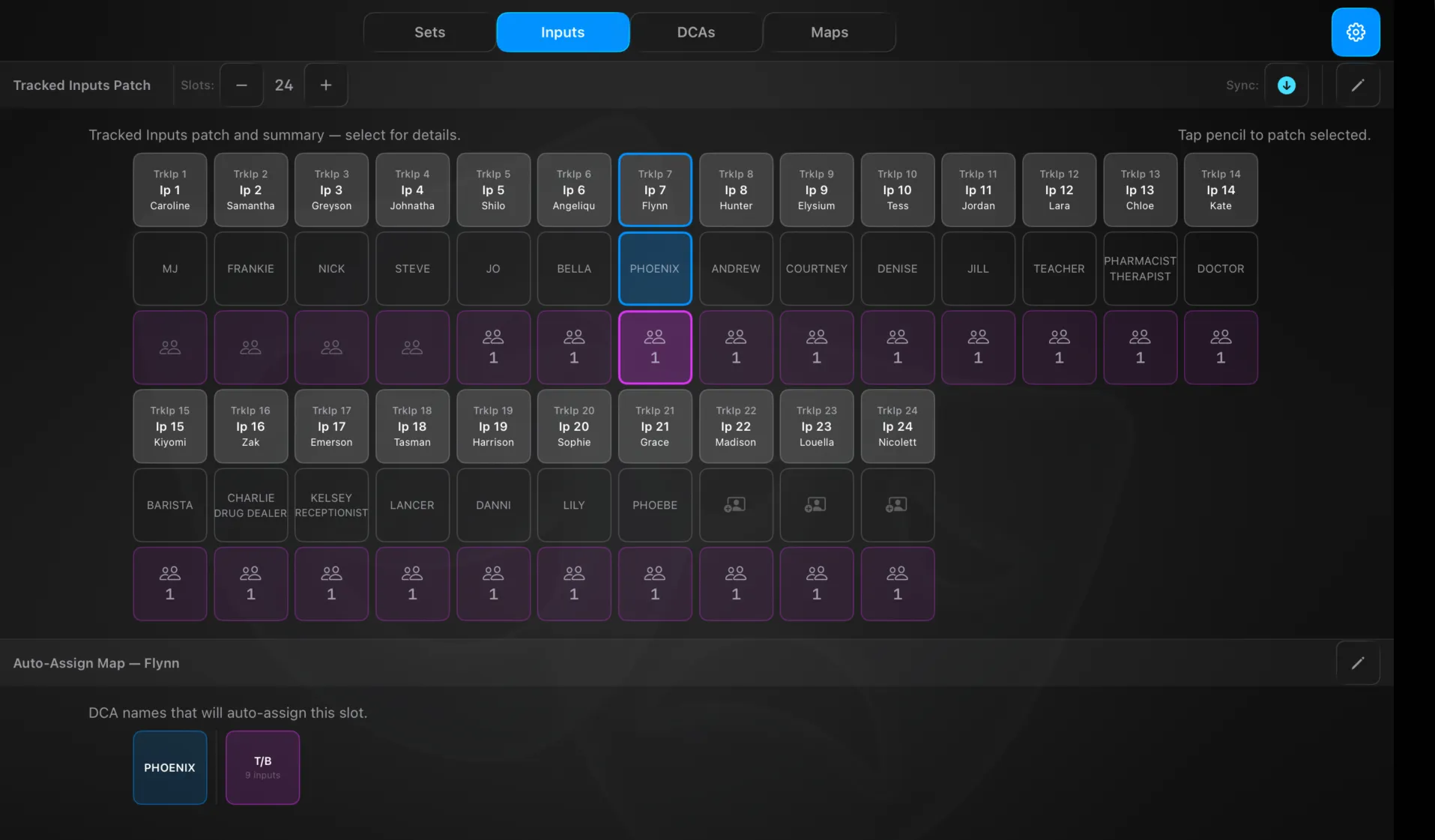
Inputs
- Tracked Inputs Patch — set the slot count (up to 48) and patch console inputs into slots. A Sync toggle chooses direction: push the tracked name/colour to the console, or pull the console’s name/colour into the slot.
- Auto-Assign Map — for the selected input, the DCA names that will auto-assign it: solo names (blue — learned when it was the only member) and group names (purple, with an input count — learned as part of a group). Edit to add or remove. Each input card also shows its current solo name and group membership at a glance.
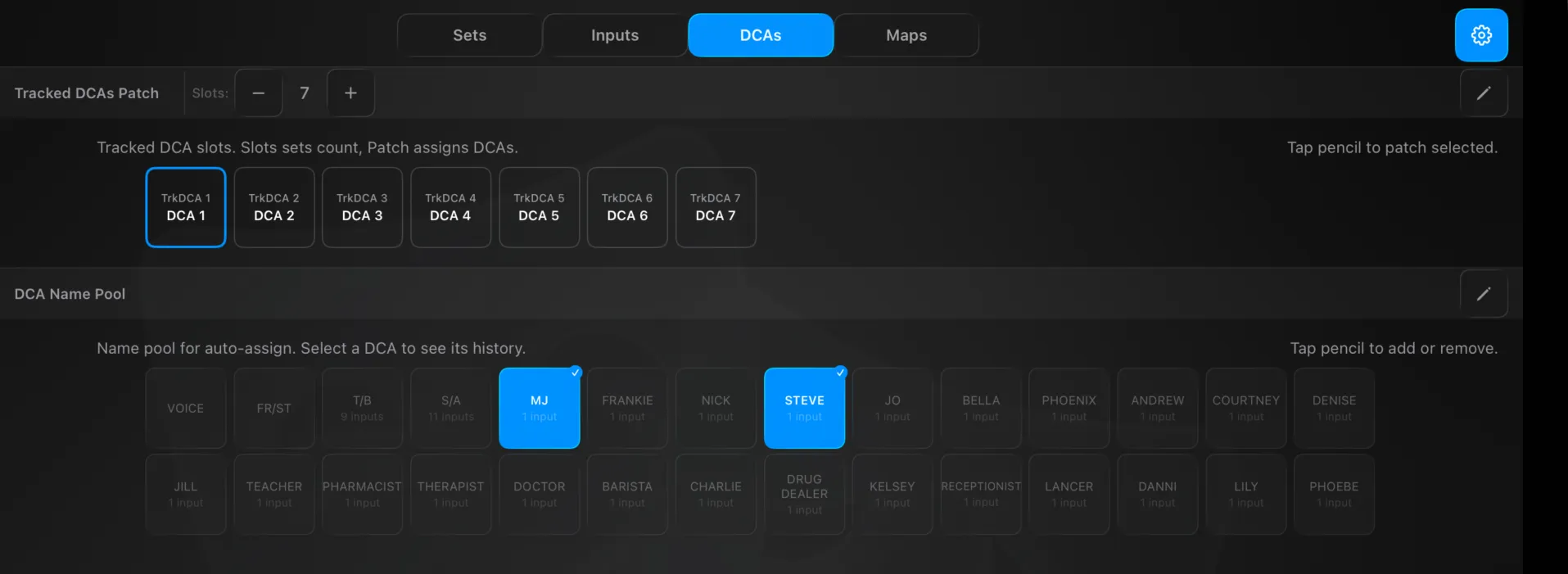
DCAs
- Tracked DCAs Patch — set the slot count (up to 24) and patch console DCAs into slots.
- DCA Name Pool — the pool of names used for auto-assign. Select a tracked DCA to see and toggle the names in its history; edit the pool to add or remove names.
Maps
The Cast Map — how Version T learns and holds a show’s names across a run.
- Solo Lock / Group Lock — freeze the auto-assign map so SmartUpdate stops relearning names mid-show. Lock solos, groups, or both once the cast is settled.
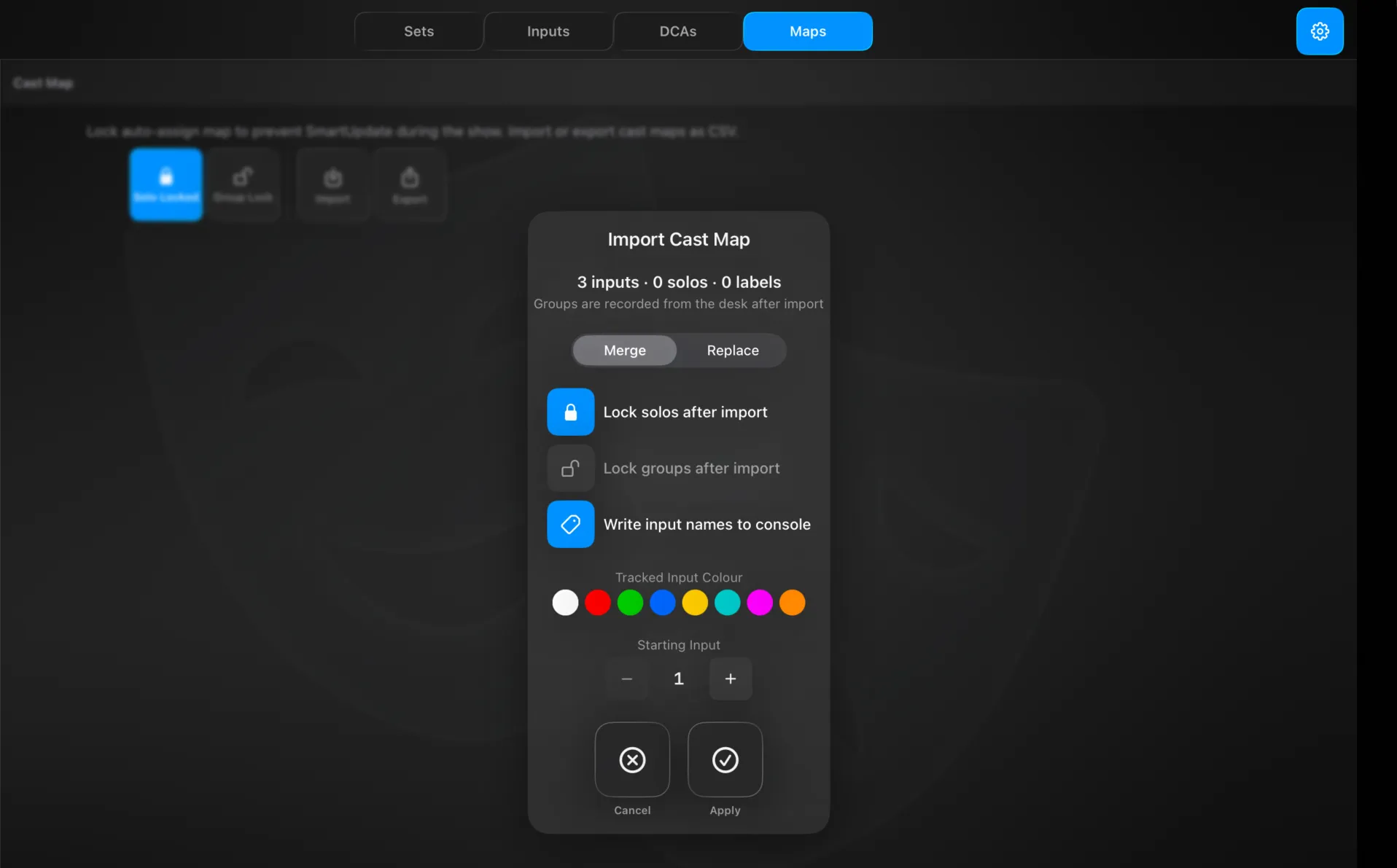
- Import / Export — move the cast map in and out as JSON. On import you choose Merge or Replace, whether to lock solos and lock groups afterwards, and whether to write the input names to the console; you also set a tracked-input colour and the starting input the list maps onto. The dialog summarises what the file holds (e.g. “3 inputs · 0 solos · 0 labels” — groups are recorded from the desk after import).
This is how you pre-load a show before rehearsals: build the cast list as JSON — CastingMap authors it for you — import it, and every performer’s name, colour and DCA history is in place before the first cue.
Limits
| Item | Limit |
|---|---|
| Tracked Inputs | 48 slots |
| Tracked DCAs | 24 slots |
| Pool Mixes | console maximum |
| Routing Sets | 8 |
Technical Reference
Routing lives in RoutingPreferences: the mix pool, trackedInputs, trackedDCAs, the sets (each with enables, levels, preFader, color), plus the auto-assign data (dcaAssignmentHistory, dcaNameHistory, namesDictionary) and autoColor settings.
Pre/post values: Pre = 0, Post = 1, Group = 2.
Matching: Version T continuously reads the console’s live crosspoint enables for each tracked input and compares them against every set’s enable pattern — the first match is shown as that input’s current set. Matching uses the enable pattern only; levels and pre/post are write-only.